Introduction
By the end of this workshop you should be able to:
- Clone a Git repository
- Add and remove files to the staging area
- Create commits with meaningful commit messages
- Create branches and pull or push branches to a remote repository
- Use the
git statusandgit logcommands to understand the current state of their working repo - Use Slack effectively
Pre-work
No prework required for this workshop as it's the first of the course.
Workshop
Explain that there are a few key aims for the rest of the day
- Ensure everyone knows how to use Slack & SigmaBot
- Ensure everyone knows how to use Git
- Ensure everyone knows how to use the coursework repositories
- Ensure everyone can write some Python code
- Write a little code, to build something fun by the end of the day!
Slack
Explain what Slack is and what it is trying to achieve
Explain the main aims of Slack
- To reduce the amount of emails sent
- To reduce the amount of meetings
- To increase the amount of communication between teams and team members
Explain the difference between @ChrisOwen, @trainees, @here and @channel
Show that if you message in a thread it will only notify the people in that thread
Reinforce that fact that messages should always be in threads
Explain how messages on Slack should always prioritise the reader rather than the sender. This means that messages should be formatted in a way that is easy to read and understand, good spelling and grammar.
Reinforce that not doing the above is a sign of disrespect to the reader. You are forcing them to do more work to understand you.
Explain how to format messages using ``` to format code
Explain that you can respond to general messages with an emoji to show engagement, but stress that messages sent to you directly warrant a full written response.
Explain that you should use the correct channel for the right task
- Questions channel for questions
- General channel for general chat
- Random channel for random chat
- Career channel for everything individual (e.g. holiday, sick, etc.) and for any career related
Reiterate you should not message people directly unless you have a good reason to do so
- It's very personal
- It's very disruptive
Explain that when messaging a coach you are often going to be one of many to ask. If the coach replies to each person individually it will take too long. You are being a good team player if you ask questions publicly.
Explain that you should use Huddles for quick meetings
Demonstrate how to use Huddles quickly
- Show that you can share your screen
- Show that you can share your camera
- Show that you can share your microphone
Show that anyone can change the settings of Slack, including changing the theme, emojis etc
Lightly suggest that adding some emojis to the workspace is a good idea
Remind trainees that emoji reactions to show engagement are a positive signal
Warn that, if someone has sent you a long, detailed message, an emoji reaction may read as dismissive
Sigma Bot
Explain that SigmaBot is a bot that can help you with questions
Demonstrate how to use SigmaBot
- Ask a question
- Do common actions (e.g. prework, quiz, group code review)
Working with Repos
Explain the process of doing coursework at Sigma Labs
- Fork the coursework repository
- Clone the coursework repository
- Enable Github Actions for the coursework repository
- Commit your code to your fork
Show the trainees the following repository that they'll be using today
https://github.com/Sigma-Labs-XYZ/Coursework-Fundamentals-Day-1
Step Through the process of using Git, cold calling trainees for each step
- Clone a repository
- Enable Github Actions for the coursework repository
- Add files to the staging area
- Commit files with a meaningful commit message
Show how you can use git status and git log to understand the current state of their working repo
Tell the trainees to follow the instructions in Getting Started to clone the coursework repository.
Help the trainee through this process.
Explain that when working with the coursework repositories, they will have some fancy Code Quality automations happening
Demonstrate that if we push our code to the repository, wait for a moment, then it will run some checks on our code
Demonstrate (after waiting two minutes) again trying to push another change to github. This time it will fail because there is an outstanding commit that hasn't been pulled.
Intro to VSCode
Explain that VSCode is a code editor that we will be using for the rest of the course
Show how to open a the repository folder in VSCode
Explain that to be able run code they're going to need to be inside something called a virtual environment
Dependencies
Explain that fairly often we want to rely on code that other people have written, rather than writing it ourselves
Explain that this is done by installing dependencies, which are packages of code that can be used in our own code
Explain that Python has a package manager called pip that can be used to install dependencies
Explain that we will be using a file called requirements.txt to specify the dependencies that we want to install
Show the trainees how to open the requirements.txt file and add a dependency to it
Explain that we can then run pip3 install -r requirements.txt to install the dependencies
Shocked show that the dependencies don't get installed because we haven't created a virtual environment yet!
Virtual Environments
Explain that a virtual environment is a way to create an isolated environment for Python projects
Diagram out something like the below to show how we can use pip3 to install dependencies in a virtual environment
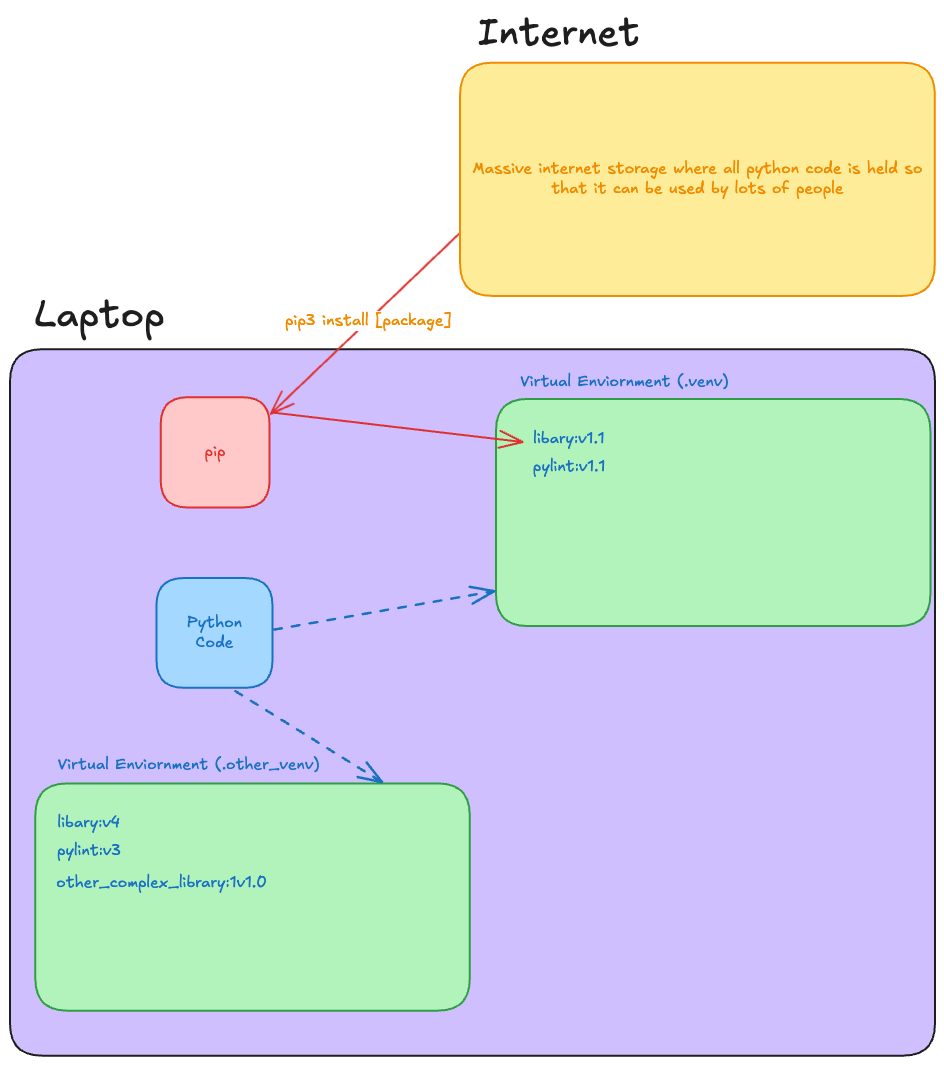
Diagram out the virtual environment process
- Create a virtual environment
- Activate the virtual environment
- Install dependencies
- Run code
Live code the process of creating a virtual environment, activating it, and installing dependencies
python3 -m venv .venv
source .venv/bin/activate
pip3 install -r requirements.txt
Explain that the virtual environment is now active, and we can run our code
python3 setup/check_install.py
Building something fun!
Explain that for the rest of the day we're going to be building something fun - we're going to playing with a Turtle
Explain that turtle is a simple graphics library that allows us to draw shapes and patterns
Explain that we'll need one more library to help us here
brew install python-tk
Run the code in the repository to show the Turtle in action
python3 drawing/draw.py
Celebrate as the Turtle draws a shape
Run briefly through the code in drawing/draw.py, showing the existing functions.
Ask the trainees how Turtle works...expecting them to be a bit confused.
Explain that there is no way we can work this out from here - we need to use the documentation.
Direct trainees's attention to drawing/challenges.md.
Instruct them to work their way through the challenges, focusing on clean, readable code as they go.
Circulate, supporting and assessing trainee skill levels as you do so. Fix any config issues.
- (OPTIONAL) Show them this relevant xkcd comic when they start trying to draw stars
Encourage trainees to share the results of the final challenge on Slack.