Modelling Databases
- Use `psql` to communicate with a PostgreSQL database
- Write `SQL` scripts that are idempotent
- Connect to and query from a database from an API
Pre-work
Watch
Throughout this week, we'll be working with relational databases.
Watch the below video on relational databases.
Read
The language used to communicate with relational databases is known as SQL.
Complete section 1 of the SQL tutorial.
Explore
Complete the following introductory SQL challenges from SQL ZOO.
Workshop
Elicit questions from the trainees about the prework. You do not need to answer all of them right now.
Motivate
Remind trainees of how they've stored data in previous weeks: in memory, in raw text, and in JSON format.
Stress that these methods are acceptable for small amounts of simple data, but as our datasets grow and represent more complex relationships, it becomes inefficient to handle them like this. What we need is a scalable solution that allows us to write complex queries.
Introduce the idea of a database: a structured store for data.
Relational Databases
Explain that we will be using a relational database, and that we will be using SQL to interact with it.
Explain that the database software we are using is called PostgreSQL (sometimes called Postgres). The language we use to interact with it is a dialect of SQL.
Ask the trainees what the drawbacks of storing data in different formats is
- In Memory (Data is lost when the program stops running)
- In a File: (Hard when you have lots of data, and hard to share between programs)
Explain that databases are a way to store data on disk and provide an interface for reading and writing that data.
Ask the trainees to explain the key benefits of doing this:
- Data is persistent
- Data can be shared between multiple programs
- Data can be stored in large quantities
- Data can be queried in a structured way
- Very large amounts of data can be stored
- Data can be queried very very quickly
Explain that designing databases is about entities and relationships.
Ask "What is an entity?"
Entities can be people, places, events, objects, concepts…
Ask "What is an attribute?"
Attributes describe the characteristics or properties of an entity
Explain that, in databases, entities are our tables - if you can’t make a table or it doesn’t have a relationship with another entity, it is probably an attribute.
Demo
Ask the trainees to share ideas for what you can make a database to store the data of (the more fantastical the better)
Prompt the trainees list the attributes of one of the entities within the database
Sketch out a single table of the database with all of the columns that the trainees suggest. Put all of the attributes in a single column.
Ensure you make this a bad database. Use lists of data in columns, don’t use relationships, don't use multiple tables, duplicate data between rows.
Ask the trainees what is wrong with this database.
- Data duplication
- Data inconsistency
- Data redundancy
- Lists are bad in databases
Sketch out how we can fix this by splitting any duplicated data into a separate table and linking the two tables together.
Explain that this is called normalisation.
Sketch out that we can remove the need for lists by moving each list item into it's own row in a separate table and linking the two tables together using a joining table
Relationship Types
Explain that there are three types of relationships in databases
- One to one relationships (e.g. User and Profile)
- One to many relationships (e.g. Author to Books, Street to Houses)
- Many to many relationships (e.g. Doctors and Patients)
Copy the below diagram into a whiteboarding tool
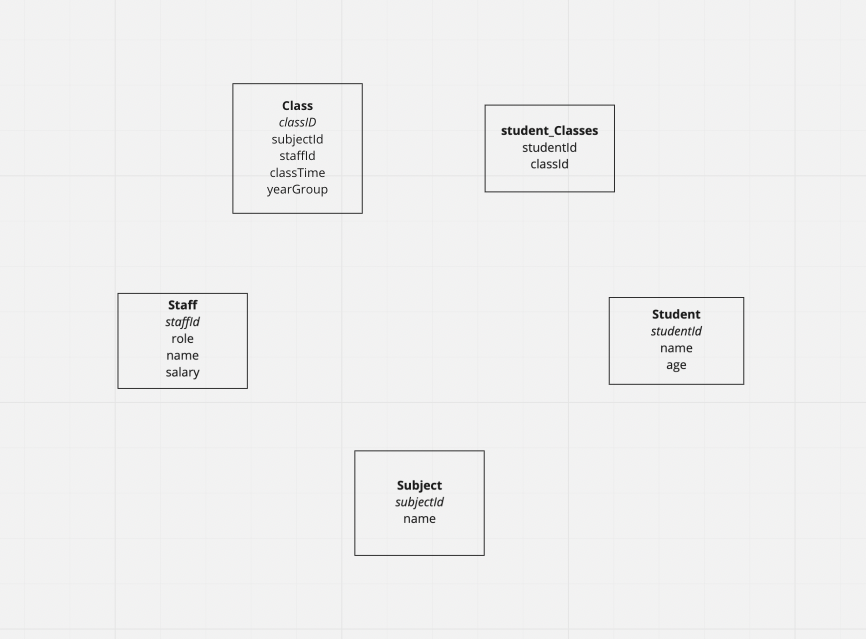
Ask the trainees "What kind of relationships might our example have?"
- One to one relationships
- One to many relationships
- Many to many relationships
Gather opinions and answers then reflect on them
Draw the relationships out on the diagram above
Intro: PSQL
Explain that we will be using PSQL to interact with our database.
Ask the trainees what they think PSQL is:
PSQL is a command line tool that allows us to interact with our database.
Demonstrate how to connect to a database using PSQL
psql postgres
Explain that this connects to the database called postgres, which is the default database
Explain you can run SQL files using PSQL
psql -f file.sql
Tell the trainees to begin on Challenge 1a and that it is important they:
- Follow along using PSQL
- Only gain a surface level understanding, they'll do loads of SQL this week
- Spend no more than a couple of hours on it
Recap
Recap what the trainees have learned today.