Normalisation & Joins
- Explain the basics of `SQL` and its application in handling databases
- Create a database and tables within PostgreSQL to organize data
- Execute queries to insert data into tables effectively
- Use `ORDER BY`, `LIMIT`, `DISTINCT`, and column renaming to manipulate query results
- Combine data from multiple tables using `JOINs` (especially `INNER` and `LEFT`)
- Use builtin SQL functions to modify and aggregate data
- Query databases using SQL
- Connect to a Database using Python
- Use `psql` to communicate with a PostgreSQL database
Pre-work
If nobody has done so already, copy and paste this command into Slack.
/prework Normalisation & Joins
Watch
Watch the below video on database normalisation.
Summarise
Write a summary of the requirements for a data model to be in Third Normal Form (3NF).
Normalise
The table below records which gym classes each member has booked onto. Normalise it into 3NF:
| MemberID | MemberName | MemberPhone | ClassID | ClassName | ClassDay | InstructorName | InstructorBuilding |
|---|---|---|---|---|---|---|---|
| M001 | Priya Patel | 07700 900111 | C01, C02 | Yoga Basics, Spin Cycling | Monday, Wednesday | Meera Fonseca, Daniel Okafor | Riverside Centre, Riverside Centre |
| M002 | Tom Hughes | 07700 900222 | C02, C04 | Spin Cycling, Boxing Fit | Wednesday, Tuesday | Daniel Okafor, Elena Petrova | Riverside Centre, Northgate Studios |
| M003 | Sara Ahmed | 07700 900333 | C01, C03 | Yoga Basics, Pilates | Monday, Friday | Meera Fonseca, Meera Fonseca | Riverside Centre, Riverside Centre |
Workshop
Third Normal Form
Elicit questions from the trainees about the prework
Explain that the normalisation process is a standard to integrate good database design.
- There are 6 steps to normalization, although in industry most databases are only completed to the fourth step.
- To complete any step, you have to have completed the steps prior to it.
- Each step is called the X Normal Form once applied to the database (where x is the step)
Quickly recap the first three Normal Forms:
- 1st Normal Form: each cell has a single value
- 2nd Normal Form: every non-key column depends on the whole primary key, not just part of it
- 3rd Normal Form: every non-key column depends only on the primary key, not on another non-key column
Ask the trainees to share their prework
Critique a couple of them
Show an example, normalising the table from the prework (0NF) step by step.
Explain that the first step is to make every cell atomic (1NF).
Move the repeating list of classes out of Member and into its own table, linked back by MemberID, so every cell holds a single value:
- Member
- Class
| MemberID | MemberName | MemberPhone |
|---|---|---|
| M001 | Priya Patel | 07700 900111 |
| M002 | Tom Hughes | 07700 900222 |
| M003 | Sara Ahmed | 07700 900333 |
| MemberID | ClassID | ClassName | ClassDay | InstructorName | InstructorBuilding |
|---|---|---|---|---|---|
| M001 | C01 | Yoga Basics | Monday | Meera Fonseca | Riverside Centre |
| M001 | C02 | Spin Cycling | Wednesday | Daniel Okafor | Riverside Centre |
| M002 | C02 | Spin Cycling | Wednesday | Daniel Okafor | Riverside Centre |
| M002 | C04 | Boxing Fit | Tuesday | Elena Petrova | Northgate Studios |
| M003 | C01 | Yoga Basics | Monday | Meera Fonseca | Riverside Centre |
| M003 | C03 | Pilates | Friday | Meera Fonseca | Riverside Centre |
Explain that the key of the Class table is now the combination of MemberID and ClassID, but ClassName, ClassDay, InstructorName and InstructorBuilding only depend on ClassID. This is a partial dependency (2NF).
Split these off into their own Class table, keeping a Booking table to link members to classes. Member is unaffected:
- Class
- Booking
| ClassID | ClassName | ClassDay | InstructorName | InstructorBuilding |
|---|---|---|---|---|
| C01 | Yoga Basics | Monday | Meera Fonseca | Riverside Centre |
| C02 | Spin Cycling | Wednesday | Daniel Okafor | Riverside Centre |
| C03 | Pilates | Friday | Meera Fonseca | Riverside Centre |
| C04 | Boxing Fit | Tuesday | Elena Petrova | Northgate Studios |
| MemberID | ClassID |
|---|---|
| M001 | C01 |
| M001 | C02 |
| M002 | C02 |
| M002 | C04 |
| M003 | C01 |
| M003 | C03 |
Point out that Meera Fonseca teaches both C01 and C03, and both rows list her building as the Riverside Centre. InstructorBuilding depends on InstructorName, not on ClassID: a transitive dependency (3NF).
Split Instructor out of Class into its own table to remove it. Member and Booking are unaffected:
- Class
- Instructor
| ClassID | ClassName | ClassDay | InstructorID |
|---|---|---|---|
| C01 | Yoga Basics | Monday | I01 |
| C02 | Spin Cycling | Wednesday | I02 |
| C03 | Pilates | Friday | I01 |
| C04 | Boxing Fit | Tuesday | I03 |
| InstructorID | InstructorName | InstructorBuilding |
|---|---|---|
| I01 | Meera Fonseca | Riverside Centre |
| I02 | Daniel Okafor | Riverside Centre |
| I03 | Elena Petrova | Northgate Studios |
Highlight
- Every column from the original table is still here, just moved into a different table. Normalising doesn't drop any data.
- Every
InstructorIDinClassmatches a real instructor in theInstructortable, and every instructor teaches at least one class. InstructorIDsits onClass, not onBooking, so each class has exactly one instructor. Sara's Yoga and Pilates classes both correctly show Meera Fonseca, and Tom's Boxing Fit class shows Elena Petrova rather than Daniel Okafor, who only teaches Tom's other class, Spin Cycling.
Ask trainees to identify the benefits of normalisation:
- Increased flexibility (easy to add/remove columns/tables)
- Decreased redundancy (smaller data footprint)
- Decreased likelihood of error (each data point appears once, rather than in many places)
Joins
State that, despite its advantages, normalisation does make actually working with databases a little more complex; we need to be able to combine different tables together in order to query effectively.
Explain the different types of JOIN
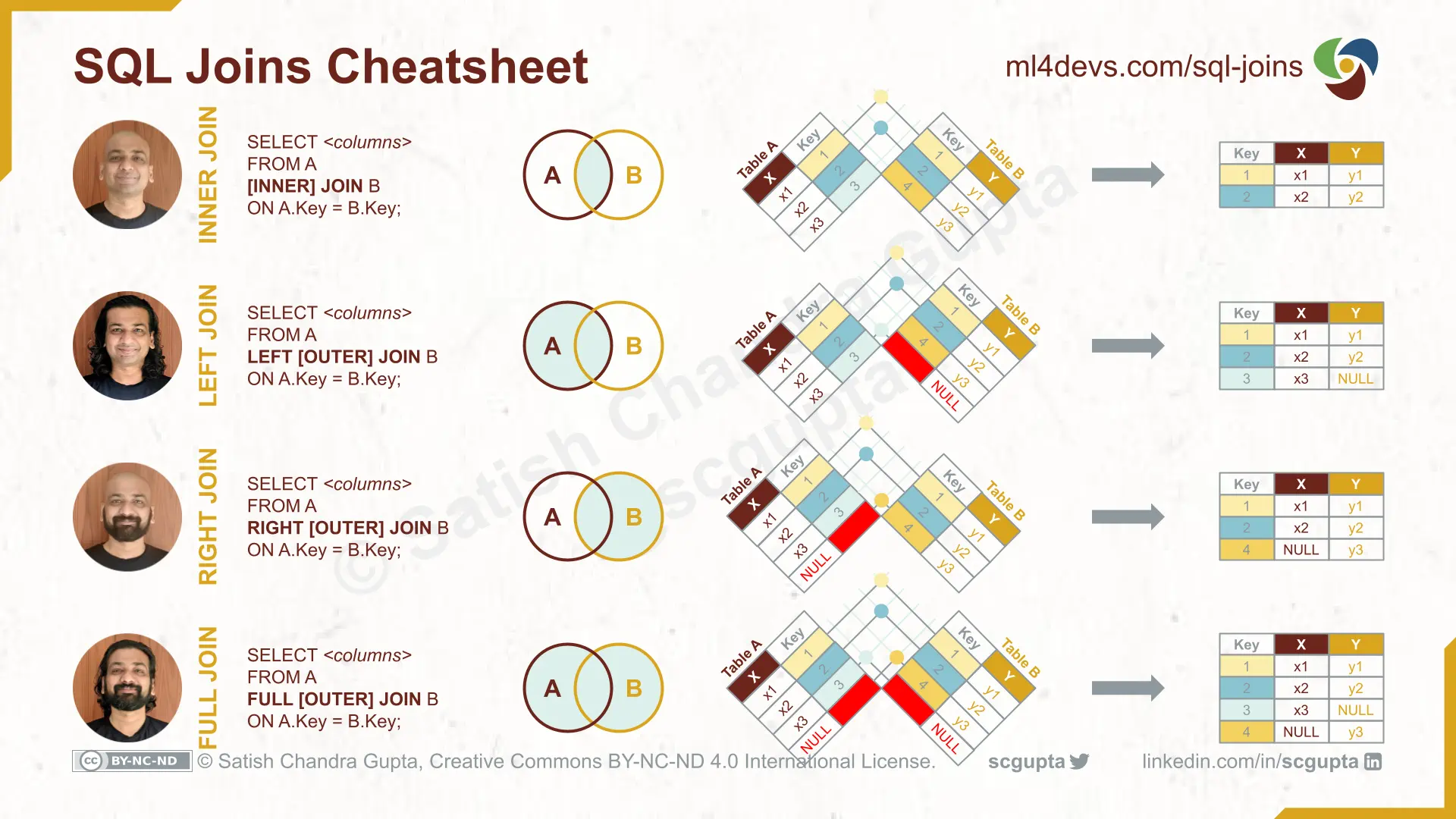
Demonstrate to trainees the syntax for using a JOIN statement using the streaming database.
SELECT title, media_type_name
FROM media AS M
JOIN media_type AS MT
    ON (M.media_type_id = MT.media_type_id)
;
Highlight
- The use of
ONto state which columns reference each other - The use of
ASto alias table names for convenience
Explain that JOINing is additive; another JOIN can always be placed after the previous one, allowing you to build up more and more complex tables to get the data you need.
Ask a volunteer to talk through an evolution of the query: we now also want to include rating information.
SELECT title, media_type_name, rating_name
FROM media AS M
JOIN media_type AS MT
    ON (M.media_type_id = MT.media_type_id)
JOIN rating AS R
    ON (M.rating_id = R.rating_id)
;
Demonstrate the different types of JOIN using the same data, showing how the rows that aren't connect will show NULL if it can't find a match.
Stress that the most common types of JOIN trainees will use will be INNER and LEFT; the others exist, but they're rarely the right choice.
Challenge
Challenge trainees to write a query to
Return the
title, anddirector_namefor all showsExtension: only include shows from the United Kingdom or Ireland.
Click here for an example solution.
SELECT title, director_name
FROM media AS M
JOIN media_type AS MT
    ON (M.media_type_id = MT.media_type_id)
JOIN media_director_link AS MDL
    ON (M.media_id = MDL.media_id)
JOIN director AS D
    ON (MDL.director_id = D.director_id)
WHERE media_type_name = 'show'
;
Grant trainees ~10 minutes to work on this.
Gather trainees back together and discuss a volunteer's solution.
Conclusion
Collate any questions on normalisation or JOINs. Answer them.
Explain that, because normalisation is an extremely widespread practice, almost all queries trainees will write from this point on will involve at least one JOIN.
Encourage trainees to develop their comfort with this topic.