RDS & Architecture
- Describe the benefits of using an RDS
- Describe what RDS is
- Provision an RDS instance
- Migrate a local database to AWS
- Attach an RDS to an EC2 instance
Prework
If it hasn't been done already, copy and paste this command into Slack.
/prework RDS and Architecture
Watch
Watch the video below to learn about RDS and its architecture.
Identify any questions that you have about RDS. Post at least one question in the Slack thread.
Diagram
Using Excalidraw or Draw.io, create a diagram of how an RDS instance on AWS would communicate with
- An EC2 instance also running on AWS
- An external computer outside AWS
Make sure you include any required security groups, subnets, and VPC.
Post a link to your diagram in the Slack thread.
Workshop
Discussion
Gather questions from the trainees about the video.
Discuss the trainees with the following questions:
- What is RDS?
- What are the benefits of using RDS?
Discuss some benefits of running PostgreSQL on RDS on AWS.
- Scalability (can scale up and down)
- Availability (can be available in multiple AZs)
- Security (can be secured with IAM)
- Reliability (can be backed up and restored)
Ask the trainee what they think some of the drawbacks of using RDS are.
Quickly overview how they have been using a Database so far in the course and how this changes now.
Highlight that you could build a database in the cloud using EC2 but this has some drawbacks.
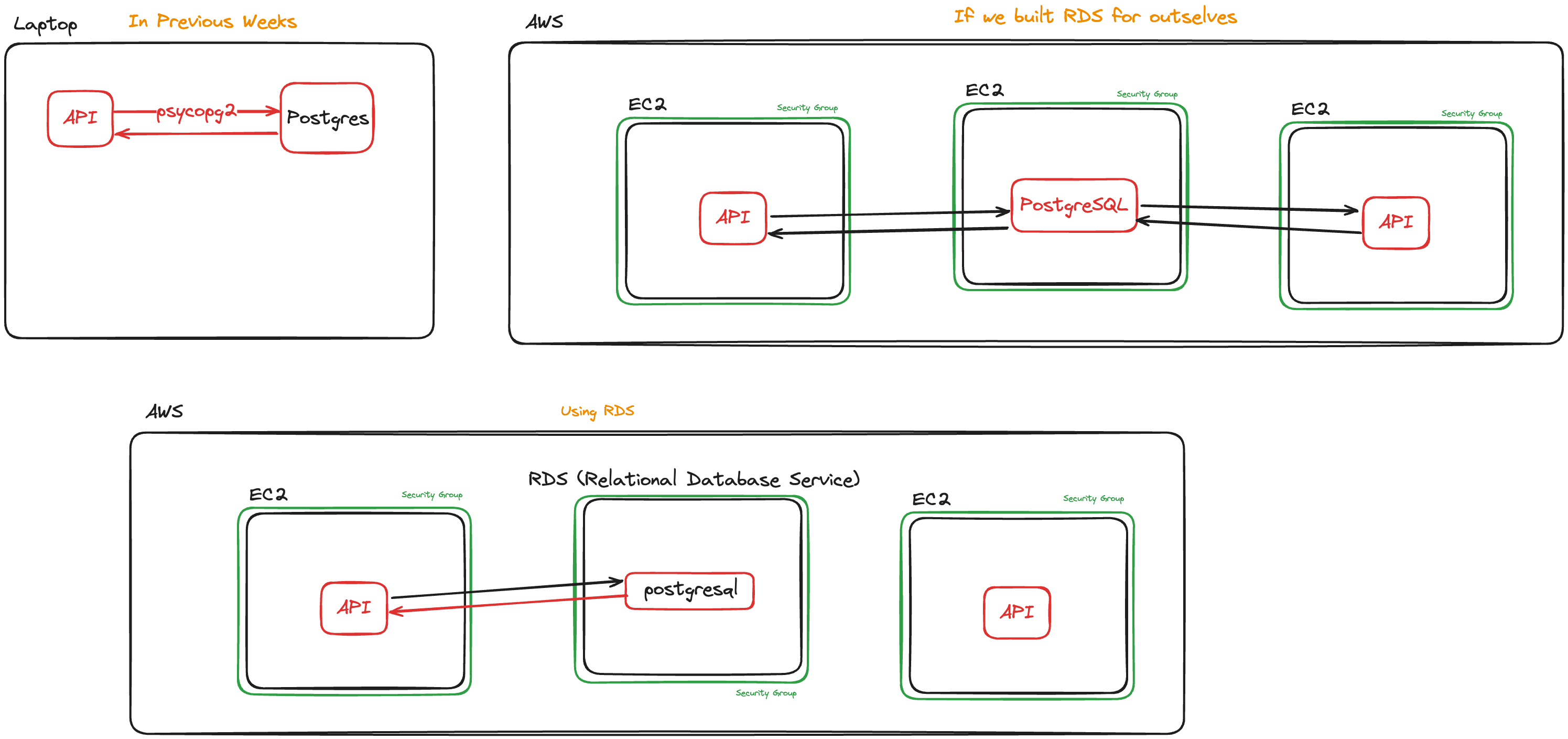
Ask the trainees what they think the drawbacks of using an EC2 instance as a database are:
- You have to manage the database yourself
- You have to manage the backups yourself
- You have to manage the scaling yourself
- You have to manage the security yourself
Explain that RDS is a managed service that takes care of all of these things for you.
Live Demo
Demonstrate how to create an RDS instance.
Explain each step as you go.
- Go to RDS on AWS
- Select 'Databases' in the left-hand menu
- 'Create database' -> 'Full configuration'
- Select the following options:
- 'PostgreSQL'
- 'Full configuration'
- 'Free Tier' (or furthest-right equivalent
- Provide values for the
- 'DB instance identifier' (following our established naming conventions)
- 'Master username' (default
postgresis fine) - 'Master password'
- Select the cohort VPC
- Allow public access
- Create a new security group
- Disable 'Performance insights'
- Leave anything not mentioned above as a default
- Create the database
Connect to the RDS instance from your local machine using psql, filling in the blanks with your specific values.
psql -h [DB_URL] -U [DB_USERNAME] -d postgres
The default rule for a new RDS security group allows access only from the current IP address of the account that creates the resource.
If you want to access the RDS from a different location later, or get the trainees to connect, you'll need to edit the inbound rule to be less exclusionary.
Live code the following scripts to set up a new database and connect to it with Python.
- setup.sql
- main.py
DROP DATABASE cakes;
CREATE DATABASE cakes;
\c cakes

CREATE TABLE IF NOT EXISTS cake (
  cake_id INT GENERATED ALWAYS AS IDENTITY,
  flavour TEXT NOT NULL,
  price INT NOT NULL,
  PRIMARY KEY (cake_id)
);

INSERT INTO
  cake (flavour, price)
VALUES
  ('chocolate', 6),
  ('red velvet', 0),
  ('victoria sponge', 3);
  from psycopg2 import connect
from psycopg2.extras import RealDictCursor

if __name__ == "__main__":

    conn = connect(cursor_factory=RealDictCursor,
               dbname="cakes",
               host="XXXXXXXX",
               password="XXXXXXX",
               user="XXXXXXXX")

    with conn.cursor() as cur:
        cur.execute("SELECT * FROM cake;")
        data = cur.fetchall()

    for row in data:
        print(row["flavour"])
Talk about environment variables and how they are used to store secrets.
Explain that we will use python-dotenv to help us to read from .envs to keep our secrets safe.
Walk through adding the environment variables to the .env file.
DB_NAME=cakes
DB_HOST=XXXXXXXXXX
DB_PASSWORD=XXXXXXXXXX
DB_USER=XXXXXXXXXX
Walk through importing the environment variables into app.py using python-dotenv.
- main.py
from os import environ as ENV
from dotenv import load_dotenv

...

if __name__ == "__main__":
  load_dotenv()
  conn = connect(cursor_factory=RealDictCursor,
                 dbname=ENV["DB_NAME"],
                 host=ENV["DB_HOST"],
                 password=ENV["DB_PASSWORD"],
                 user=ENV["DB_USER"])
Demonstrate that the code still works as before, but now doesn't contain sensitive values.
Explain how important it is to not commit the .env file to GitHub. Use the .gitignore file to prevent this.
Recap the session by asking the trainees
- What is an RDS?
- What are the benefits of using an RDS?