Load Balancers & Scaling
- Set up a load-balancer in AWS
- Set up a target group in AWS
- Redirect traffic to a load-balancer in AWS
- Describe the role of a load balancer in the Cloud
Prework
Setup
If it hasn't been done already, copy and paste this command into Slack.
/prework Load Balancers and Scaling
Watch
Watch the following two videos, taking notes throughout and be prepared to discuss them in the workshop.
Identify any questions that you have about load balancers. Post at least one question in the slack thread.
Diagram
Using Excalidraw or Draw.io, create a diagram showing how the following system components are related:
- A load balancer
- A target group
- Several EC2 instances running the same server program
- An external user
Make sure you include any required security groups, subnets, and VPC, as well as connections showing the flow of information.
Post a link to your diagram in the Slack thread.
Workshop
Setup
Ensure you have watched the videos in the prework.
Ensure you have access to the AWS console.
Discussion
Gather questions from the trainees in a collaborative environment (e.g. Excalidraw)
Cold call trainees to answer the following questions:
- What is a load balancer?
- What is the purpose of a load balancer?
Discuss the answers to the questions as a group.
Live Demo
Explain that we will be creating a load balancer in AWS using an Application Load Balancer.
Diagram out the architecture of the load balancer like the example below. Be sure to include the following components:
- Load Balancer
- Target Group
- EC2 Instances
- Security Group
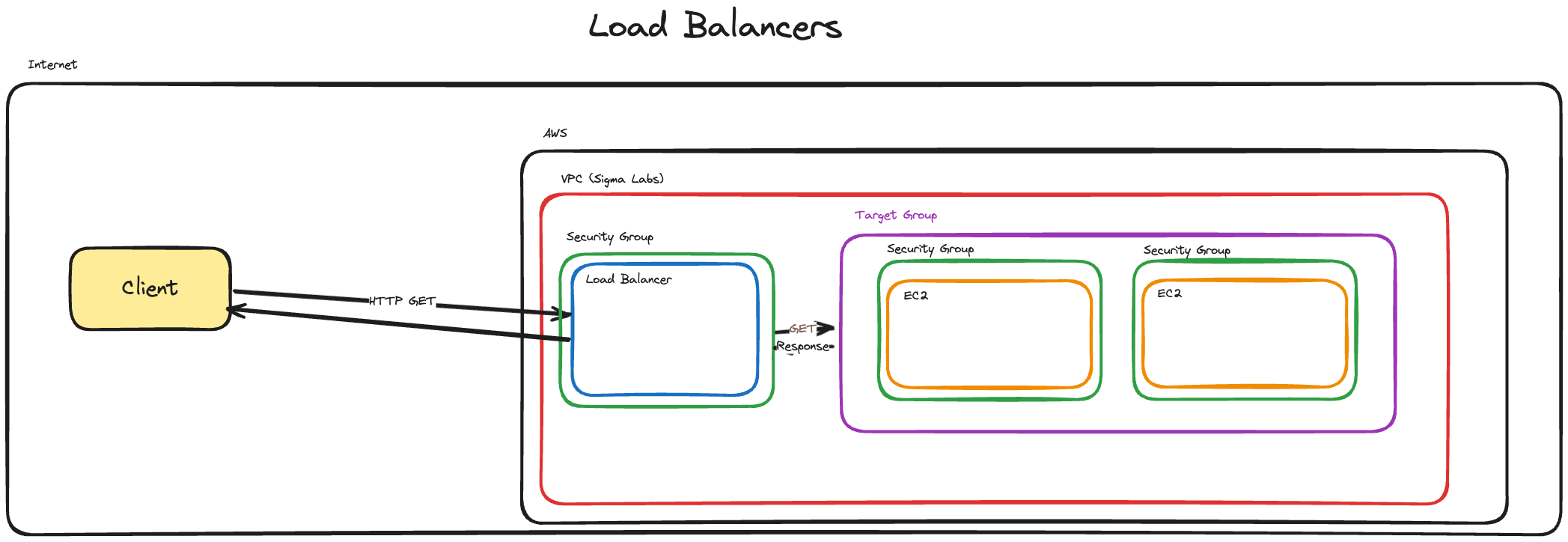
Explain that one of the other key benefits of a load balancer is that you can re-route form one port to another. This is useful for when you have a service running on a port that is not the default port (80 for HTTP, 443 for HTTPS).
Demonstrate creating the following cloud infrastructure in the AWS console with the following capabilities:
- Run a tiny flask application that returns some HTML on the root
- You will need to install python and pip using
sudo yum -y install python-pip python3.11
- Remind trainees that
sudois only available to them on EC2, not their devices- Running on port 8008
- Create a load balancer that listens on port 80 and forwards to port 8008
- Create a target group that listens on port 8008
- You should highlight:
- Health checks
- Scaling options
Example code:
Demonstrate this working by visiting the public DNS address of the load balancer in your browser.
Discuss the benefits of load balancers and how they can be used to scale applications.
Demonstrate creating a second EC2 instance and adding it to the target group. Ensure you have different HTML on the root of the second instance so that you can tell the difference between them
Discuss how the load balancer can be used to distribute traffic between the two instances.
Demonstrate the load balancer distributing traffic between the two instances by refreshing the page multiple times and showing the different HTML responses.
Wrap Up
Recap the key points of the workshop.
Ask if there are any questions.