Stream Processing
- Explain the use cases of stream-processing platforms/tools
- Publish messages to a Kafka topic
Pre work
Set up
If nobody has done so already, copy and paste this command into Slack.
/prework Stream Processing
Research
Research Apache Kafka, finding answers to the followinq questions:
- What is it?
- What are its main advantages/drawbacks?
- How does it work?
Put your answers in the Slack thread.
Reading
Explore the confluent-kafka documentation.
What does it allow you to do? What configuration does it need? What controls are exposed to you?
Annotation
Take a copy of the below code and store it in a file.
"""A small example of a Kafka producer."""

from os import environ

from dotenv import load_dotenv
from confluent_kafka import Producer


if __name__ == "__main__":

    load_dotenv()

    kafka_producer = Producer({
        "bootstrap.servers": environ["BOOTSTRAP_SERVERS"],
        'security.protocol': environ["SECURITY_PROTOCOL"],
        'sasl.mechanism': environ["SASL_MECHANISM"],
        'sasl.username': environ["USERNAME"],
        'sasl.password': environ["PASSWORD"]
    })
Annotate it carefully. What is happening on each line? What is the overall result?
Workshop
Setup
Obtain the Kafka cluster credentials.
Create a .env file containing them:
BOOTSTRAP_SERVERS=XXXXXXXXXX
SECURITY_PROTOCOL=SASL_SSL
SASL_MECHANISM=PLAIN
USERNAME=XXXXXXXXXX
PASSWORD=XXXXXXXXXX
GROUP=1
AUTO_OFFSET=latest
TOPIC=cohort
Introduction
Introduce the pub-sub pattern.
Explain that this is a common pattern in Advanced Data for handling high-volumes or realtime data.
Introduce Kafka as one implementation of this model amongst many.
Kafka
Talk through the core concepts of Kafka:
- A cluster of nodes sharing data between them
- Producers sending messages to particular topics
- Messages being stored on partitions within topics
- Each message having an offset within its partition & topic
- Groups of consumers processing each message
Draw the process out while explaining it; it helps to visualise.
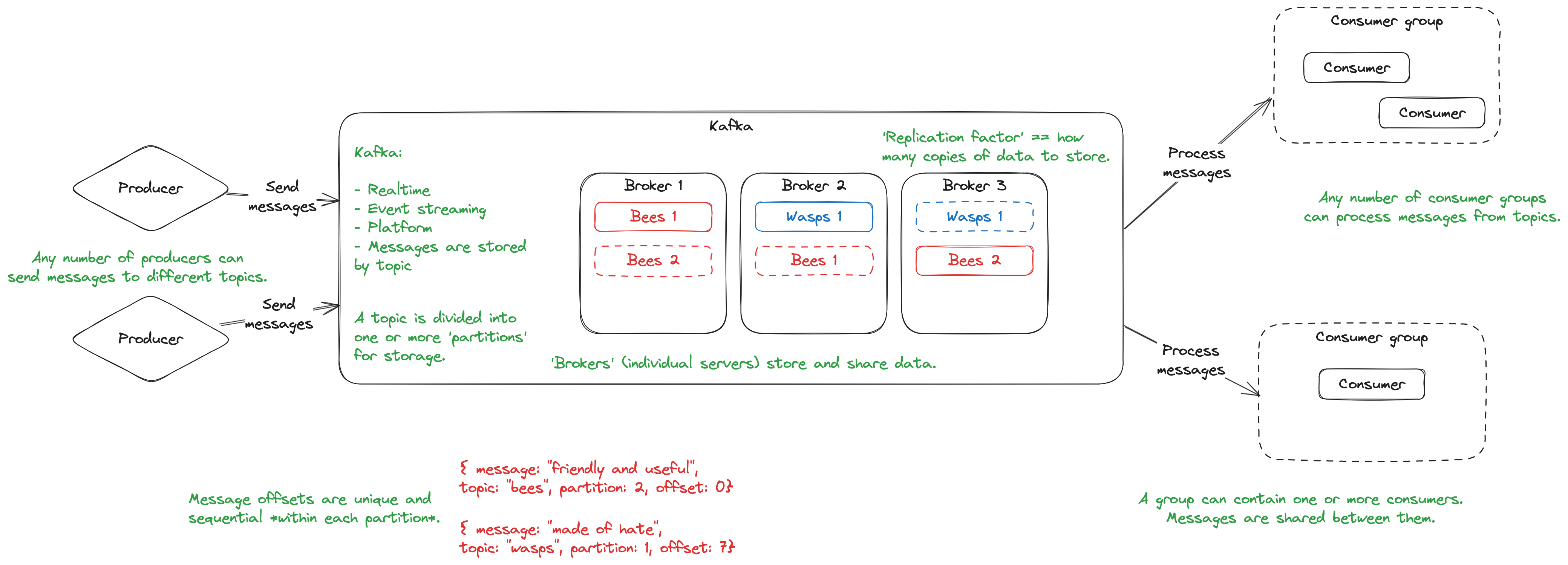
The cluster
Show trainees the cluster on Confluent Cloud.
Point out the lmnh topic (relevant for the coursework) and the cohort topic (used in this workshop).
Explain that any messages produced are sent here, and any messages consumed are taken from here.
Show some messages from one of the topics - note the timestamp, offset, and value.
Producing
Introduce confluent-kafka as a library that allows communicating with Kafka clusters from Python.
Create a producer.py file:
"""A small example of a Kafka producer."""

from os import environ

from dotenv import load_dotenv
from confluent_kafka import Producer


if __name__ == "__main__":

    load_dotenv()

    kafka_producer = Producer({
        "bootstrap.servers": environ["BOOTSTRAP_SERVERS"],
        'security.protocol': environ["SECURITY_PROTOCOL"],
        'sasl.mechanism': environ["SASL_MECHANISM"],
        'sasl.username': environ["USERNAME"],
        'sasl.password': environ["PASSWORD"],
        'logger.level': 3
    })
Explain that the above code creates a producer: an object that can send messages to a given Kafka topic. Note that the logger level simply filters out the Telemetry messages that Kafka can often generate and obscure our terminal output with. Level 3 will still allow Errors through.
Warn that this, on its own, does nothing: we have the capability to send a message, but we haven't actually done it yet.
Challenge
Challenge trainees to send a message including their own name to the cohort topic.
Encourage them to use the confluent-kafka documentation to guide them.
Grant trainees no more than 10 minutes to get this working.
Keep the Confluent Kafka page open to the topic and shared, so that successful messages can be seen.
Gather trainees back together and discuss the code to send messages.
    kafka_producer.produce(topic="cohort", value="Hello!")

    kafka_producer.flush()  # Waits for all messages to be sent.
Highlight the following:
- The arguments required for
.produce() - The use of
.flush()to ensure that all messages are sent
Demonstrate that running this file adds a message to the cohort topic.
Highlight to trainees that the producer is just Python code; there's nothing special about it, and it could be part of any larger program. A producer isn't a special kind of script, but term for any application that sends messages to a Kafka cluster.
Conclusion
Gather and answer outstanding Kafka questions.
Play a quick recap game by making Kafka-related statements and getting trainees to signal True or False.
- A cluster can have multiple brokers (True)
- A producer can only write to one topic (False)
- Different consumers can read the same message (True)
- Every broker in a cluster holds a full copy of every topic's data (False)
- ...